Mobile App Tagging Health Check using BigQuery (Part I)
This article shows a way to test mobile app tagging using BigQuery and to quickly reveal tracking inconsistencies between the Android and iOS platforms. Part I shows how to reveal event-level discrepancies, and showcases the use of the WITH() expression that makes it easier to build complex columns.
Although mobile apps have been around for a long time, and even the very structure behind GA4 is based on Firebase principles, tracking and measurement is a lot harder in mobile applications than on websites. There are various reasons for this, which I won't bore you with, though for the purposes of this article, it would be prudent enough to call out some of them:
- it's a lot more legwork to put the tags in place (even the measurement plan takes more time to put together)
- heavy reliance and dependency on developers (also: information can sometimes get lost in translation when liaising with them)
- the Android and the iOS variants of the app are developed by two different teams (and they usually "behave" differently)
- it's much more difficult to test mobile app tracking than web tracking
In summary, this meme — albeit originally based on a "generic sentiment" — particularly well applies to the mobile app situation:

Note that there are many analytics tools that are specifically adept at data collection for mobile apps, but we'll specifically deal with Firebase here, as it's directly related to GA4, and is one of the most frequent and default app analytics platforms. Firebase being free is also definitely a major contributor to its wide-spread use.
So, let's dive into how we can deal with the challenges listed above. We'll also leverage two relatively new BigQuery features: the WITH expression and the Query Parameters.
Testing mobile apps
If you want to roll up your sleeves and test what data the mobile app is collecting, there are some ways, e.g. using the DebugView feature in Firebase, or the Analytics Debugger for Apps. But one of the fastest and most comprehensive ways to check the correctness of the data collected is — surprise, surprise — exporting the raw event data from GA4 (or Firebase) to BigQuery, and checking it there.
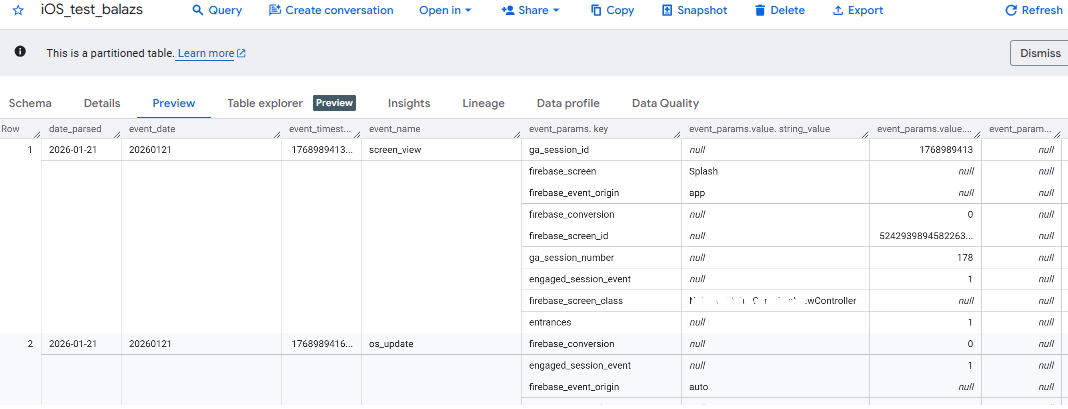
The actual test couldn't be any simpler: we just take the events_ table (or events_intraday_) and we check out every single event, along with its parameters and values — default and automatic alike. The "rawness" of the raw data is really valuable here: you can inspect each and every data point and then cross-check it with the measurement plan.
Retrospective health check: Android vs iOS side by side
Similarly, the BigQuery export can be used to look at a larger time interval in the past, and then check what events, parameters and values have been collected in that time period, thereby performing an overarching tracking health check. Since there are two separate development teams involved, what very often happens is that mistakes occur in one platform at a time, but usually not both. This means two things:
- The platform dimension should always be included in any mobile app related data quality analysis.
- It’s good to show the results side by side, which might reveal further inconsistencies and thereby may help identify issues that would remain hidden otherwise.
So let’s see how that comes together. When we compare event volumes in Android and iOS side by side, we can look for differences in 3 layers:
- (1) Events that are not consistent
- (2) Event parameters that are not consistent (this is not too frequent, but it can happen)
- (3) Event parameter values not collected in a consistent way. (This happens quite a bit.)
Part I, i.e. the current article, deals with (1) above. Part II will expand on this to query discrepancies between parameters and parameter values, and will also show another neat way to query and explore all these discrepancies together in one master view.
Event volume health check — Android vs iOS side by side
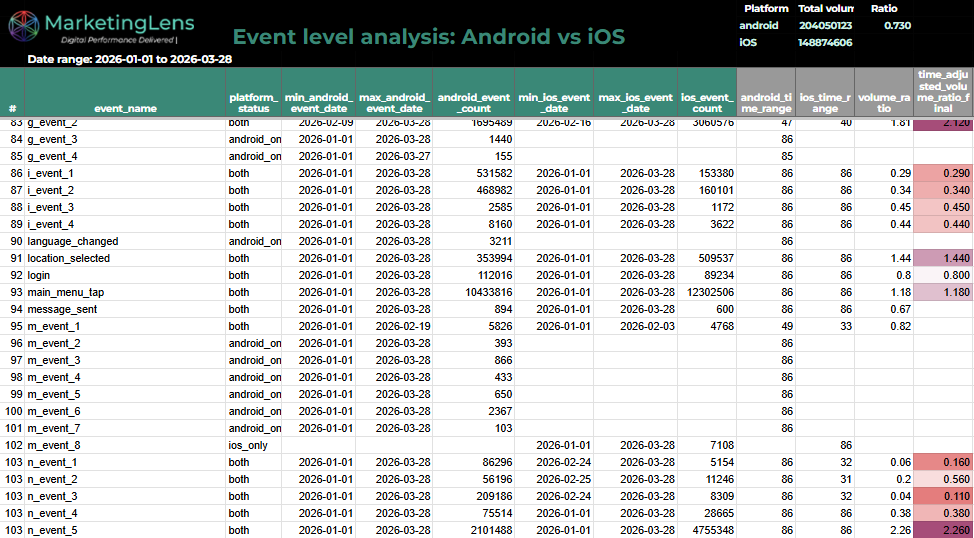
In the first example, we'll fetch the list of events in each platform, get their volumes and the timeframes they've been collected in, and we'll put them side by side for a better view. For "relevant" events, we'll also calculate the volume ratio between the two platforms; and since this is a "laborious" calculation involving multiple steps, we'll utilize the relatively new WITH() expression (new as of early 2026) that allows sequentially calculating columns by easily by calling the previous column by its name in each step.
