Multi-level aggregations (AVG(SUM() GROUP BY))
This article illustrates the nested / multi-level aggregation syntax introduced in July 2026 on a GA4 query example.
One of the cool features of BigQuery is the continual addition of handy SQL features that make life easier. The cloud databases on the forefront seem to be competing shoulder-to-shoulder on this — when one comes out with a feature or built-in function, the others follow suit. This is great for us users.
An example is the recently (summer of 2026) added multi-level aggregation feature. Similarly to how the QUALIFY clause saves us an extra CTE when filtering on window function outputs, multi-level aggregations are aggregation functions nested under each other in a single SELECT statement, instead of performing one in a CTE or subquery and referencing it in another query to get the desired output.
Let's observe it on an example where we want to calculate the average daily revenue broken down by a dimension of our choice, e.g. the users' originating medium:
SELECT
  traffic_source.medium AS traffic_medium,
  -- Nested aggregate: First SUMs revenue by date, then AVGs those daily sums per traffic medium
  AVG(SUM(event_value_in_usd) GROUP BY parse_date('%Y%m%d', event_date)) AS avg_daily_revenue
FROM
  `bigquery-public-data.ga4_obfuscated_sample_ecommerce.events_*`
WHERE
  event_name = 'purchase'
  -- Restrict to wildcard tables (e.g., full year of 2020 data in this public dataset)
  AND _TABLE_SUFFIX BETWEEN '20200101' AND '20201231'
GROUP BY
  traffic_medium
ORDER BY
  avg_daily_revenue DESC;
Obviously we could get a lot more sophisticated than this (e.g. use the session_traffic_source_last_click object instead of traffic_source), but it proves the point, and the public GA4 example doesn't have all the new columns.
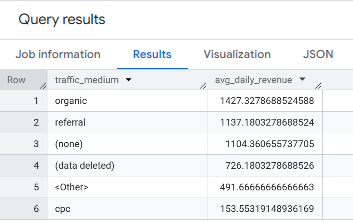
Anyway, here is the result:
This is how we had to write the query before the multi-level aggregation feature became available:
WITH daily_revenue_by_medium AS (
  -- Step 1: Calculate the total revenue per day for each traffic medium
  SELECT
    traffic_source.medium AS traffic_medium,
    PARSE_DATE('%Y%m%d', event_date) AS purchase_date,
    SUM(event_value_in_usd) AS total_daily_revenue
  FROM
    `bigquery-public-data.ga4_obfuscated_sample_ecommerce.events_*`
  WHERE
    event_name = 'purchase'
    AND _TABLE_SUFFIX BETWEEN '20200101' AND '20201231'
  GROUP BY
    traffic_medium,
    purchase_date
)

-- Step 2: Average those daily totals per traffic medium
SELECT
  traffic_medium,
  AVG(total_daily_revenue) AS avg_daily_revenue
FROM
  daily_revenue_by_medium
GROUP BY
  traffic_medium
ORDER BY
  avg_daily_revenue DESC;
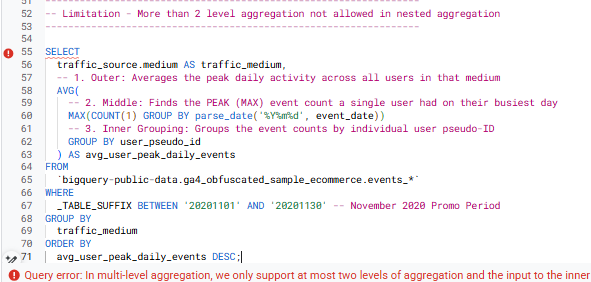
Note that we cannot go "too far" with this feature — the "multi-level" actually only means "2 levels" — as cramming three or more aggregations will throw an error message:
Still a useful feature and helps make code be neater and more intuitive. There are a good few such shorthands that I'm not really a fan of, when it abstracts away a level of complexity that should actually be exposed, thereby allowing "lazy coding" (e.g. I wouldn't use SELECT * EXCEPT() in a production pipeline) — but this one keeps very close to the same concept as how window functions work, and thus doesn't have that much downside to it.
Now, go enjoy nested aggregations and build smaller queries! Let me (and other readers) know in the comments if you come across any hurdles, or you have any suggestions to this article.
